Most hosts start with a spreadsheet, and for good reason. It costs little or nothing, you may already know how to use one, and you can bend it to fit your rental. The trouble is that a short-term rental has more moving parts than a long-term lease: nightly revenue, guest-paid cleaning fees, lodging taxes you collect for someone else, platform fees, and a steady stream of small expenses.
This guide gives you a column layout you can copy into any spreadsheet program, including free ones, explains why each column is there, and then looks honestly at where spreadsheets tend to break and what a dedicated browser-based tool changes. It is general information and a set of suggestions, not tax or accounting advice, so please check anything that applies to you with a qualified tax professional.
In short: keep one row per transaction, keep gross income, fees and collected taxes in separate columns, and tag every expense with a property and a category. A spreadsheet can do that well, but only with steady discipline. Software can enforce some of it for you.
Four Rules for a Vacation Rental Bookkeeping Template
Whatever tool you use, these habits do most of the work:
- One row per transaction. One stay, or one receipt, per row. Avoid merged cells and blank spacer rows, which make totals and filters unreliable.
- Gross first, fees second. Record what the guest paid, then record fees as their own entries. A payout deposit is often the net figure, and recording only the deposit hides part of your income and part of your costs.
- Keep collected taxes apart. Lodging tax you collect from guests belongs in its own column, not blended into revenue. Ask your CPA and your local tax office how it applies to you.
- Tag everything. Every row gets a property and, for expenses, a category. Tags are what let you total by month, by property or by category later.
The Income Tab: A Transient Lodging Ledger Format
Local lodging-tax rules often use the term "transient lodging" for short stays, and a ledger built around that idea is simply one line per stay, with room revenue, fees and tax collected side by side. Here is a layout to start from:
| Column | What goes in it | Why it is there |
|---|---|---|
| Booking reference | The confirmation code or your own number. | Ties each row to a payout and to any related expenses. |
| Property | A short, consistent name. | Lets you total each property separately, even if you only have one today. |
| Check-in and check-out | Two date columns. | Show which month the stay belongs to and let you count nights. |
| Nights | Check-out date minus check-in date. | Feeds occupancy and average nightly rate. |
| Room revenue | The nightly charges before fees and taxes. | Your core booking income, kept separate from add-ons. |
| Cleaning fee (guest-paid) | What the guest was charged. | A separate line from what you pay your cleaner, so neither disappears into the other. |
| Other guest fees | Pet fees, extra-guest fees and similar. | Keeps one-off charges visible. |
| Lodging tax collected | The tax charged to the guest. | Tracked on its own so it is not counted as revenue. |
| Guest total | The sum of the amounts above. | Should match what the guest actually paid. |
| Payout date and payout amount | When and how much was deposited. | Lets you match deposits to stays at month-end. |
| Source and notes | Booking platform or direct, plus anything unusual. | Helps you sort and explain odd rows later. |
A worked example row
Here is how one stay might look. All amounts and the tax percentage are fictional, and the tax rate and what it applies to vary by location:
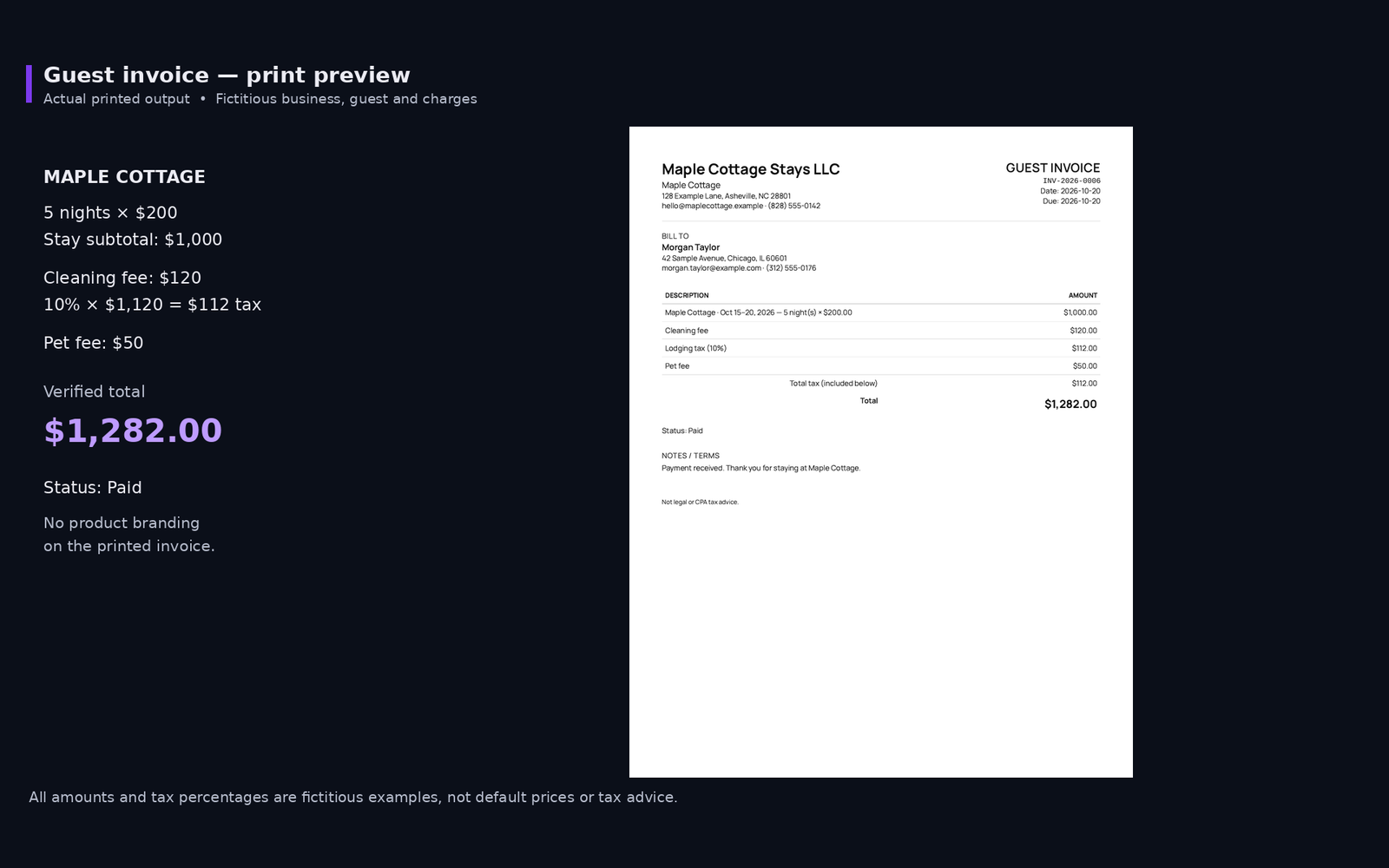
- Property: Maple Cottage. Check-in October 15, check-out October 20, so 5 nights.
- Room revenue: 5 nights at $200 is $1,000.
- Cleaning fee: $120. Pet fee: $50.
- Lodging tax collected: a sample 10 percent applied to $1,120 is $112.
- Guest total: $1,000 + $120 + $50 + $112 = $1,282.
Notice that the guest total is not your income. Your CPA may treat the pieces differently, which is exactly why they sit in separate columns.
The Expense Tab
Expenses are simpler, but they need more discipline because they arrive in many small pieces.
| Column | What goes in it | Why it is there |
|---|---|---|
| Date | The date of the purchase or invoice. | Puts the expense in the right month. |
| Property | The same names used on the income tab. | Keeps property totals accurate. |
| Vendor | Who you paid. | Makes receipts and invoices easy to find. |
| Category | Pick from a fixed list. | Drives your totals. A fixed list avoids near-duplicates such as "Cleaning" and "Cleaners". |
| Description | A few words on what it was. | Jogs your memory at tax time. |
| Amount | A number only, with no currency text. | Text mixed into an amount can stop it from adding up. |
| Booking reference (optional) | The stay it relates to, if any. | Ties per-stay costs, like a cleaner invoice or guest supplies, back to a booking. |
| Repair or larger purchase? | A yes or no flag. | Reminds you to record date and cost for bigger items so your CPA can decide how to treat them. |
| Receipt location | A file name or folder note. | So you can find the proof later. |
For the category list itself, many U.S. hosts start from the expense lines on Schedule E. Our Schedule E expense category checklist walks through the common ones.
How to Track Guest Expenses in a Spreadsheet
Guest-related costs, such as welcome supplies, consumables, linens and the cleaner's invoice, are easy to lose track of because they are small and frequent. (Our guide to turnovers and maintenance logs covers the repair and upkeep side.) The optional booking reference column helps: put the stay's reference on each guest-related expense, then filter by it to see what a particular stay actually cost you to host. Keep the guest-paid cleaning fee on the income tab and the amount you pay your cleaner on the expense tab. They are two different entries.
The Summary Tab
Add a third tab with one row per property per month. It might show revenue, expenses, and net for that month. Most of this can be done with SUMIFS, a function that adds up amounts matching your conditions. For example, this adds up expenses for one property in one category:
=SUMIFS(Expenses!F:F, Expenses!B:B, "Maple Cottage", Expenses!D:D, "Supplies")
The column letters depend on your layout, so adjust them to match. The same formula works in most spreadsheet programs, whether they run on your computer or online. Our monthly bookkeeping routine covers what to review each month once you have these totals.
Desktop File or Online Spreadsheet?
Either kind of spreadsheet can hold this layout. Some differences to weigh:
- A desktop spreadsheet file lives on your computer unless you choose to store it elsewhere. That keeps it private by default, but makes sharing and backing up your responsibility.
- An online spreadsheet lives in the cloud, which makes it easy to share with a cleaner, partner or CPA and often lets you browse earlier versions. It also means you need to be careful about who has access to the link.
If you have been searching for a free rental property tracker in Excel or a Google Sheets rental template, the tabs above are a starting point you can build in about five minutes in either one, or in any similar program. Google Sheets is free with a Google account. Excel is usually part of a paid Microsoft 365 subscription or a one-time Office purchase, although Microsoft has offered a limited free web version with a Microsoft account, so check Microsoft's current plans. Free programs such as LibreOffice Calc can also open and edit Excel files. Keep the column names exactly the same across tabs, because consistency matters more than anything else you can do.
Why Formulas Fail (Even Good Ones)
Plenty of hosts run clean books in a spreadsheet, and it can work well with care. The problem is that a spreadsheet has no guardrails, so a small mistake can quietly stay in your totals. Here are the failures that tend to show up most:
- A formula gets typed over. One cell in a column of formulas is replaced with a number. Everything looks normal, but that row no longer updates.
- New rows fall outside the range. A total that adds
F2:F100will not include row 101. Totals can look fine while quietly leaving out the newest entries. - Sorting scrambles a table. Sorting only part of a table can pull values out of line with the rest of their row, so dates, amounts and categories no longer match.
- Numbers and dates turn into text. Pasted amounts or dates can look right and still be treated as text, so they are skipped in totals.
- Category typos. "Cleaning", "cleaning" and "Cleaners" are three different categories to a summary formula, and any one of them can drop out of a total.
- Inserted columns shift references. A formula that pointed at the right place last month may point at the wrong one after someone adds a column.
- Many copies, no master. "Final", "final v2" and "final v2 (real)" soon exist side by side, and nobody is sure which is current.
- One file, one failure. A deleted, overwritten or corrupted file with no recent copy can take a year of records with it.
A Five-Minute Self-Check for Your Spreadsheet
- Compare your summary total with the sum of the raw rows. They should match.
- Filter each column for blanks and for odd values, such as text in an amount column.
- Check that every formula range includes your newest row.
- Compare your monthly revenue and expenses with your bank activity.
- Save a dated copy somewhere other than the same computer or account.
What a Dedicated Local Browser Tool Changes
Dedicated bookkeeping software cannot remove every error, and you should still compare it with your bank statements. But it can remove several of the failures above by design:
- Set fields instead of open cells. Records are entered into fields with a set purpose, so a stray typed-over formula or a number-as-text problem has less room to happen.
- Built-in categories, with room for custom entries. Entries are sorted into a set list of categories, so typos do not split your totals. Some tabs also let you create custom entries when your rental needs something the list does not cover. That flexibility is useful, but it is worth keeping custom names consistent, just as you would in a spreadsheet.
- Totals the software calculates. You do not maintain the formulas. Dashboard and report figures come from the records you have saved.
- Collected tax kept apart. Tax collected is reported separately and not added to revenue.
- One set of records. No competing copies of "final".
There are tradeoffs too. A local-first tool keeps your records in your own browser on your own device, which keeps them private but means saving backups is up to you. Our guide to JSON backups and local-first software explains the routine. You also still enter your payouts and expenses yourself, because the tool does not connect to booking platforms or banks.
Replacing the Spreadsheet With the Single-Property Host Starter Kit
The Single-Property Host Starter Kit is built for the host with one rental who is outgrowing a spreadsheet. It runs in your web browser and keeps your income, expenses and guest details there, never uploaded to our servers. The only thing we store is your login: your email address and a password saved as a one-way hash, which is customary for any software with accounts so that you can sign in and reset a forgotten password (see our privacy policy). Here is how the spreadsheet tabs above map onto it:
| Spreadsheet tab | In the Starter Kit |
|---|---|
| Income tab | Guest invoices and income entries, with room charges, cleaning fee, other fees and lodging tax as separate lines. |
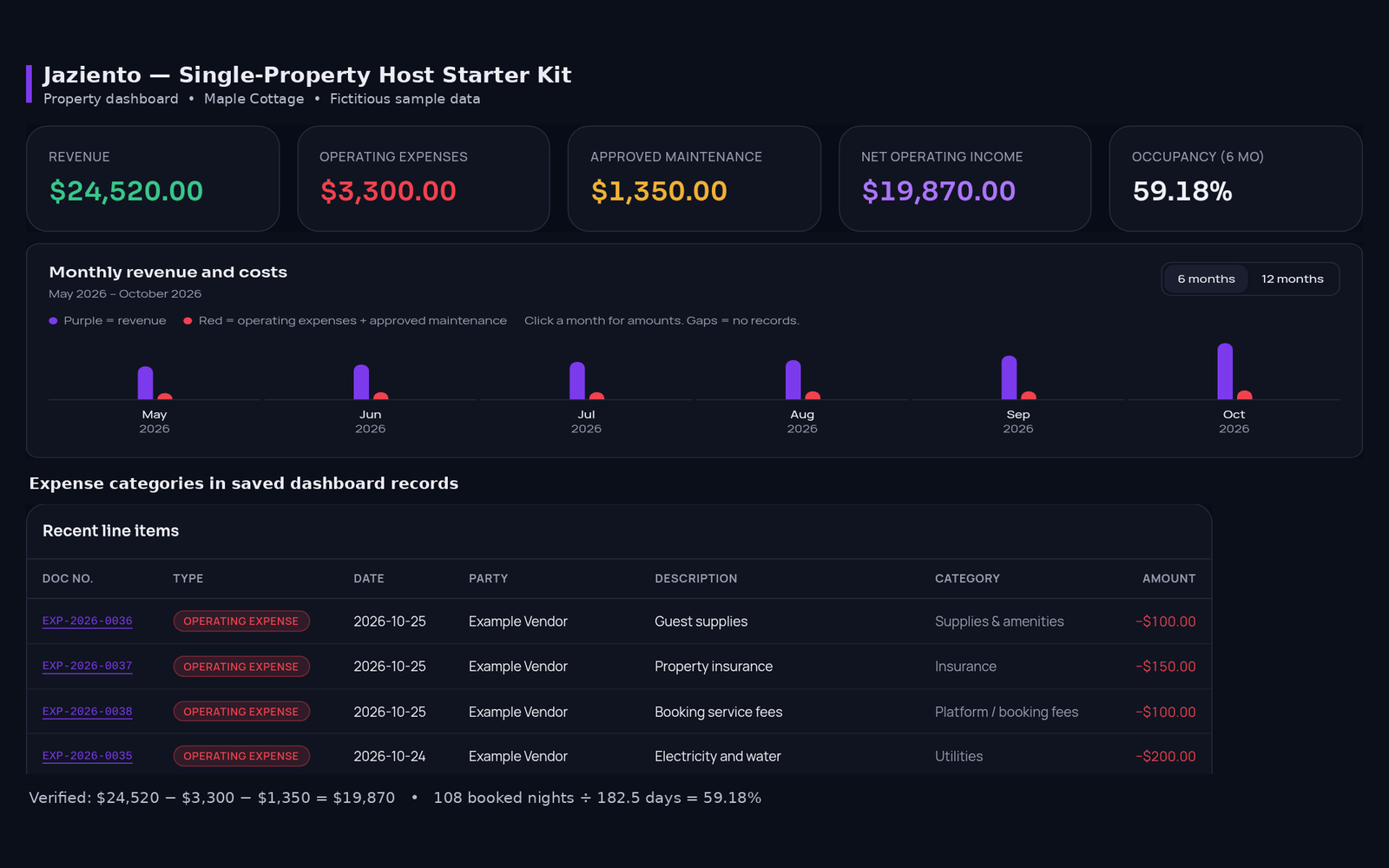
| Expense tab | Expense entries sorted by categories modeled on Schedule E as you log them. |
| Summary tab | A property dashboard with revenue, expenses, maintenance, net operating income and occupancy, plus a monthly P&L. |
| Year-end totals | Reports filtered by category and date, with a cash-basis view, print option and CSV export. |
| "Save a copy" | JSON backups you save yourself, with a backup reminder on every screen. |
No Monthly Bill
The Starter Kit is a one-time $69 purchase with lifetime access, no subscription, and a 7-day money-back guarantee. If you later add more properties, the Command Suite ($99) covers 2 to 10, with a combined profit and loss across properties. You can compare the two, or read our guide to one-time purchases versus subscriptions to decide which fits you.
A Gentle Way to Switch
- Start at the beginning of a month or a year, so you are not splitting a period between two systems.
- Keep your old spreadsheet as a read-only archive of past periods.
- For your first month, compare the Starter Kit totals with your bank activity before you rely on them.
- Save your first JSON backup early and keep a copy somewhere separate.
Quick Answers
Is there a free rental property tracker in Excel I can build myself?
Yes, you can build one yourself with the income, expense and summary tabs above, and the layout costs nothing. Excel itself is not always free, though. It usually comes with a paid Microsoft 365 subscription or a one-time Office purchase, and the free web version has limits. Google Sheets and LibreOffice Calc are free alternatives that work with the same layout. Beyond the software cost, the real cost is your time and the care it takes to keep formulas, categories and ranges correct.
Can I use a Google Sheets rental template for short-term rental bookkeeping?
Yes. The same columns and SUMIFS formulas work in Google Sheets and most other online spreadsheets, with the added convenience of sharing. Be mindful of who has access to the file, and see our monthly routine for a simple review habit.
Does the Starter Kit give tax advice?
No. It is bookkeeping and organization software. Its categories and reports help you organize records, but they do not tell you what to report. Ask a qualified tax professional about your situation.