← All suites Schedule E rental property tracker

Single-Property Host Starter Kit

A Schedule E rental property tracker for the host with one rental. Keep organized short-term rental books from the first booking, with no subscription attached. Your records stay private in your own browser, never uploaded, and you can save JSON backups whenever you like.

$69one-time · lifetime access

Made for U.S. hosts and Schedule E. Backed by a 7-day money-back guarantee. Checkout is handled by Gumroad. What happens after you buy.

Not tax advice. Jaziento is software, not an accounting firm. Schedule E categories help you organize records; they don't tell you what to report. Ask a qualified tax professional about your situation.

What's included

Tools to help one rental keep organized books.

It is designed to replace your booking-platform income and expense spreadsheet with a short-term rental bookkeeping template that sorts income and expenses as you log them.

  • Vacation rental profit and loss template with a monthly P&L for your property, at a glance.
  • Property dashboard with revenue, expenses, maintenance, net operating income, occupancy and a 6 or 12 month chart on one screen.
  • Schedule E categories so income and expenses are sorted as you log them.
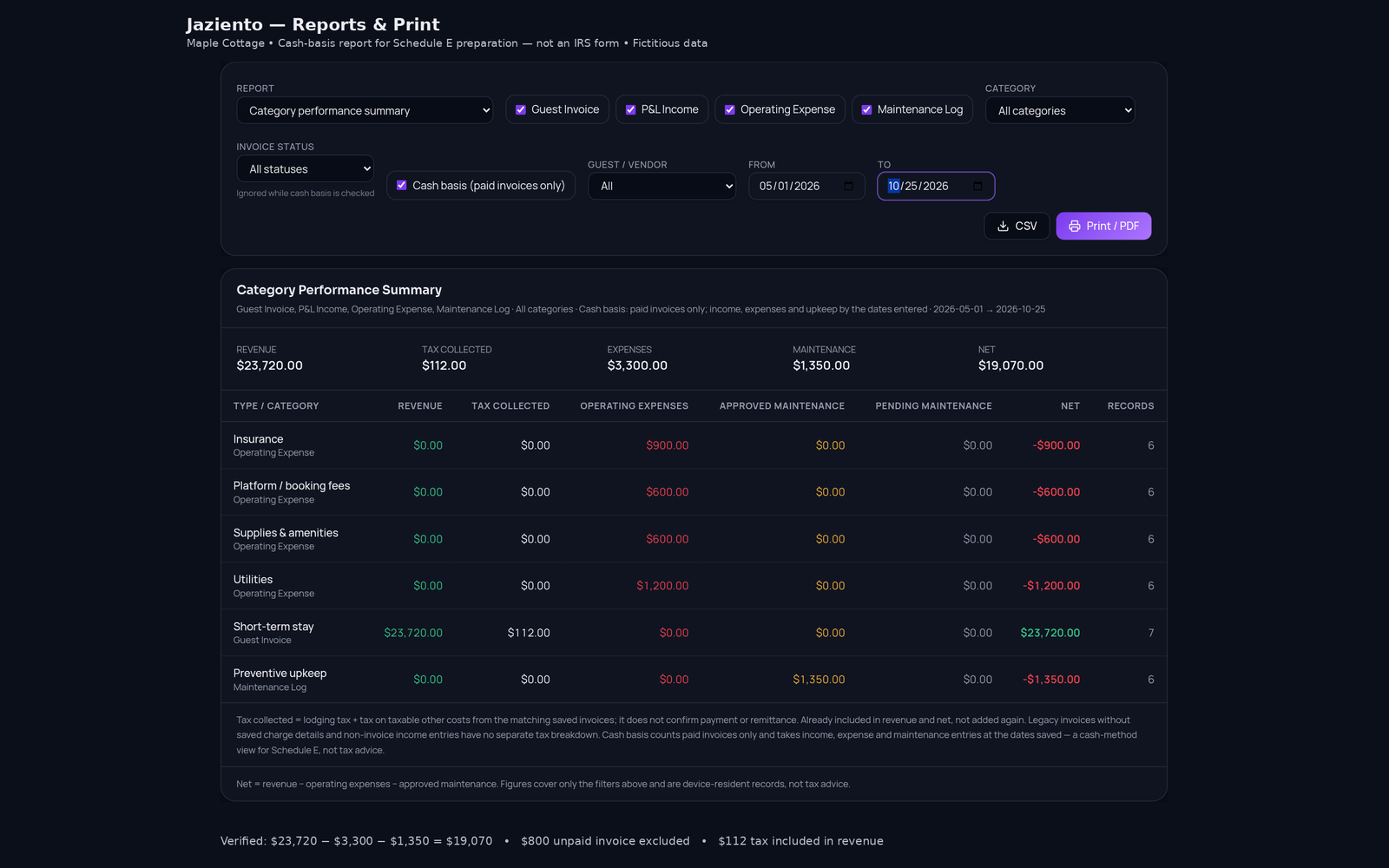
  • Print-ready invoices and reports for guest invoices, monthly and category summaries, and a cash-basis view for Schedule E, filtered by the categories and dates you choose.
  • Local-first and private with data kept in your browser and JSON backups.
  • A landlord accounting spreadsheet, upgraded for booking-platform and direct bookings, with income, expenses and categories in one view.
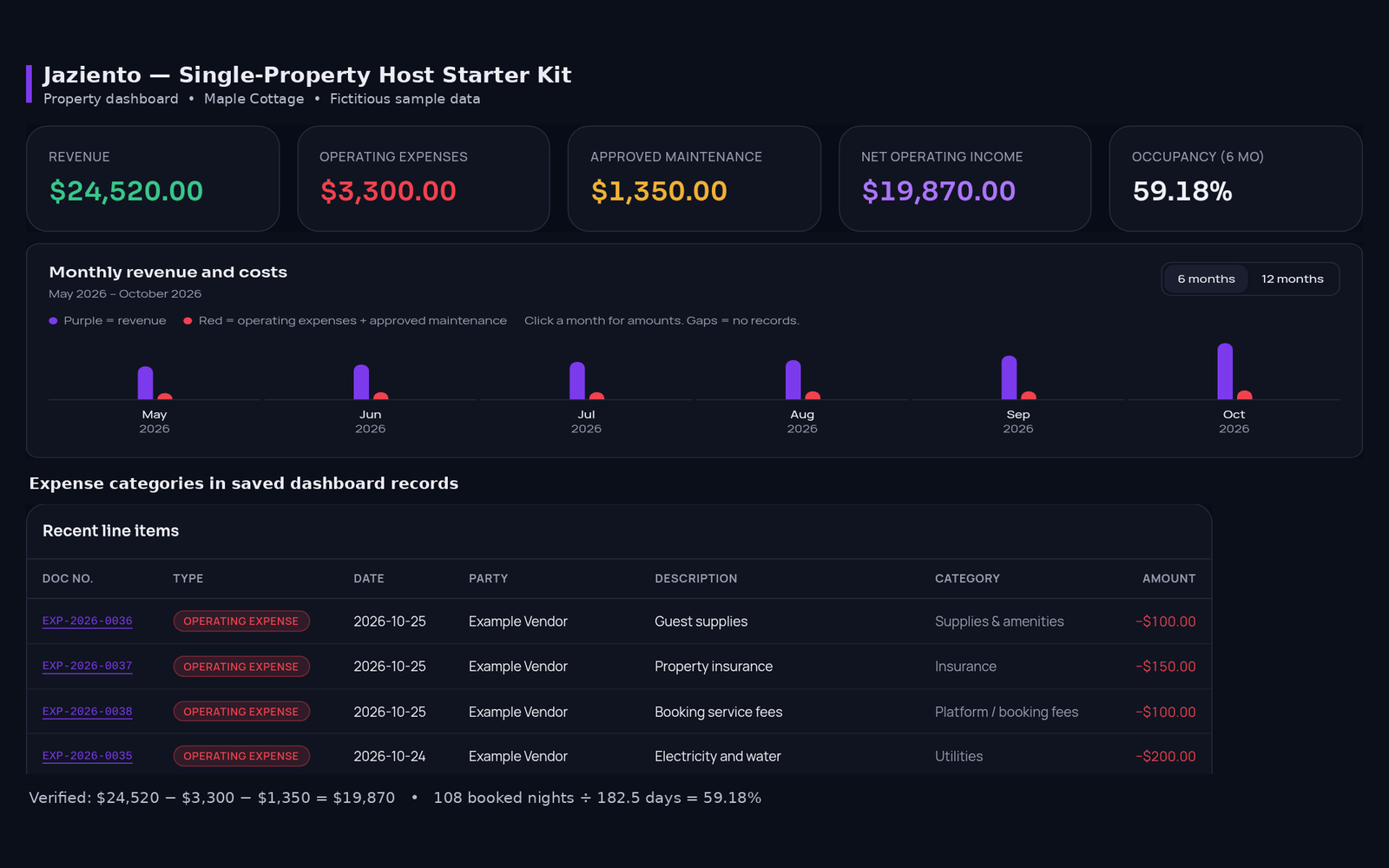
Starter Kit property dashboard for Maple Cottage showing revenue, operating expenses, approved maintenance, net operating income and occupancy, a six-month revenue and cost chart, and recent expense line items
Property dashboard. Revenue, expenses, maintenance, net operating income and occupancy on one screen. Fictional sample data.
Starter Kit Reports screen with filters for document type, category, invoice status and dates, a cash-basis category performance summary, and totals for revenue, tax collected, expenses, maintenance and net
Reports, with a cash-basis view. Filter by type, category, status and dates, then print or export a CSV. Fictional sample data.
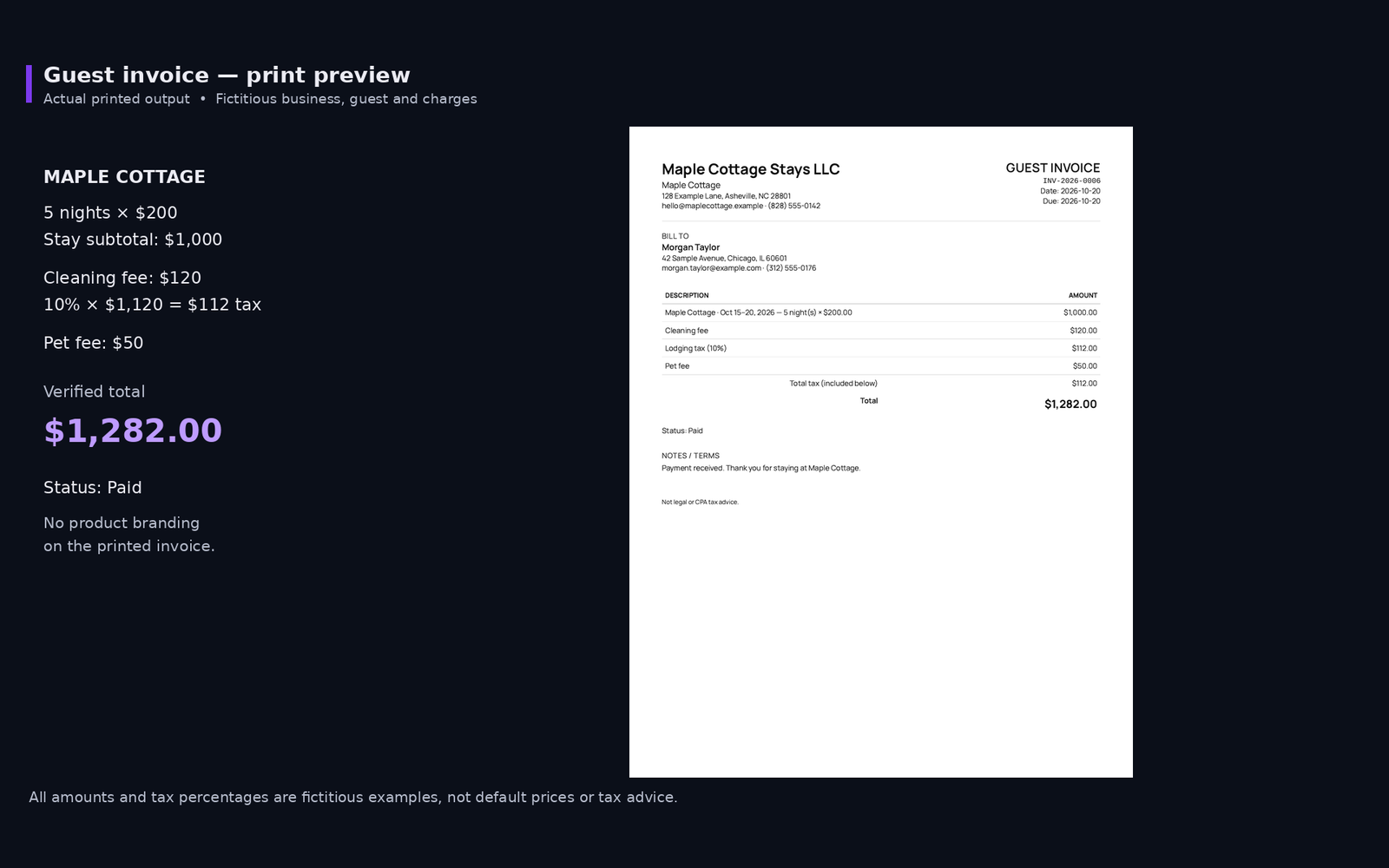
Print preview of a guest invoice from Maple Cottage Stays LLC with nightly rate, cleaning fee, lodging tax, pet fee and a total of $1,282.00, marked paid
Print-ready guest invoice. A clean invoice with no product branding. Fictional business, guest and charges.
Privacy and backups

Private, local-first, with JSON backups.

  • Private by design

    Your income, expenses, property details and guest information are never uploaded to our servers. No bank linking, and we don't have access to them. Keeping your own device secure is up to you.

  • Local storage in your browser

    Local-first means your records are saved in the browser on your own device, so the Starter Kit is quick and your books stay with you.

  • JSON backups you control

    Save a JSON backup file to your own computer whenever you like, and import it again to restore your records. Since your data lives in your browser, saving a backup now and then is a good habit.

Is it right for you?

Built for the host with one rental.

  • One rental, one set of books

    Keep income, expenses and categories for your property in one view, instead of a spreadsheet full of tabs and copy-pasted totals.

  • Made for U.S. hosts

    Entries are sorted by Schedule E categories, a U.S. federal tax form. It is not designed for other countries' tax rules.

  • Room to grow

    Adding a second door later? You can move your records into the Command Suite. The FAQ explains how.

Beta tester feedback

What a beta tester said.

This is one beta tester's personal experience and opinion, shared with permission. It is not a guarantee, and your experience may differ. The tester may have received free or early access to the software.

“I just bought my very first rental property and I've been shopping around, honestly assuming that all property management software required expensive monthly subscriptions and complicated setups. I didn't even realize that local, zero-subscription tools like this were an option. I gave the Single Host Suite a try, and it's been fantastic so far. It's super easy to understand, but what really surprised me is how it has features for tracking maintenance and income that I didn't even know I was going to need. I believe this tool will definitely help me get off on the right foot.”

JoyBeta tester. Just bought a first rental property and tried the single-property tool.
After you buy

How to get started with the Starter Kit.

  • Buy through Gumroad

    Use the buy button on this page. Gumroad handles checkout and emails you a receipt. Use an email address you check, because you will need it again in step 3.

  • Open the tool from your receipt

    Your Gumroad receipt includes the web address of the tool. It also includes your unique license key. Keep that email. Can't find it? Search your inbox for Gumroad, or write to support@jaziento.com.

  • Create your account

    The first time you open it, sign up with the same email address you used to buy. Choose a password and enter the license key from your receipt. The key is only needed when you create your account. After that, you log in with your email and password. Forgot it? Use the "Forgot password" button on the login screen.

Questions

Starter Kit FAQ.

Who is the Starter Kit for?

It is for independent U.S. hosts with a single short-term rental who want clean books from the first booking. If you manage several rentals, the Multi-Property Operations & Tax Command Suite is the better fit.

Does it connect to my booking platforms?

No. It works for bookings from online booking platforms and for direct bookings, but it does not connect to any of them. You add your payouts and expenses yourself.

Can I print invoices and reports?

Yes. Guest invoices print as a professional invoice, with an optional EIN, due date and notes. Reports give you record lists, monthly and category summaries, and asset and property reports, filtered by document type, category, guest or vendor, invoice status and dates. A Cash basis option shows paid invoices only, and tax collected is reported separately, never added to revenue. The tax depreciation summary groups original asset costs for your accountant; it does not calculate deductions or depreciation.

What if I add more properties later?

Export a backup file from the Starter Kit and import it into the Command Suite. Your business profile, invoices, income, expenses and maintenance entries come across, and you choose whether to merge them with what is already saved or replace it. It is a one-time import, not an automatic sync. Review your records after importing to make sure everything came across as you expect.

Is there a money-back guarantee?

Yes. The Starter Kit comes with a 7-day money-back guarantee, counted from the date of purchase. It applies to each purchase, so if you buy it more than once, you can ask for a refund on each one. Once your funds are returned, your access ends immediately. Your records stay in your own browser, so save a JSON backup first if you want to keep a copy. Questions? Write to support@jaziento.com. See the Terms of Use for details.

Does it give tax advice?

No. It is bookkeeping and organization software, and we are not accountants, CPAs, or tax preparers. Its categories and reports help you organize records. They are not complete, and they don't guarantee your records are accurate or tell you what to report. For advice on your specific situation, please talk with a qualified tax professional.

Start with clean books.

One property, one set of records, no monthly fee.

Also from Jaziento: the Local Concierge & Amenity Suite, a guest guidebook and property hub for $49.